Vee Techno Electronics – TV Repair Service Hyderabad

LG TV Repair in Hyderabad

Looking for reliable LG TV repair in Hyderabad? Explore expert tips, troubleshooting guides, and practical solutions for common LG TV problems, from black screens and power issues to sound and connectivity troubles, ensuring your TV runs smoothly.

MI Android TV displaying the PatchWall interface experiencing lag, optimized for speed by MI TV repair in Hyderabad.
LG TV Repair in Hyderabad

Is Your MI TV Extremely Slow or Freezing? How to Speed It Up

Is Your MI TV Extremely Slow or Freezing? How to Speed It Up The Burden of Bloatware and Cache MI Smart TVs offer fantastic value and run on a customized Android platform (PatchWall). However, over months of usage, downloading apps, and streaming content, the internal memory gets clogged. This results in lagging menus, delayed volume control, and apps crashing unexpectedly. How to Give Your MI TV a Speed Boost Clear the Cache Daily: Use the built-in “TV Manager” app to clear memory and optimize RAM. Delete Unused Apps: Smart TVs generally have limited storage (often just 8GB). Uninstall games or streaming apps you no longer use. Disable Auto-Play: Turn off auto-playing trailers on the PatchWall home screen to reduce background processor load. If your TV is completely frozen on the “MI” startup logo and won’t respond to the remote, the eMMC (storage chip) on the motherboard might be corrupted. We specialize in software flashing and motherboard recovery. Contact us for the fastest MI TV repair in hyderabad.

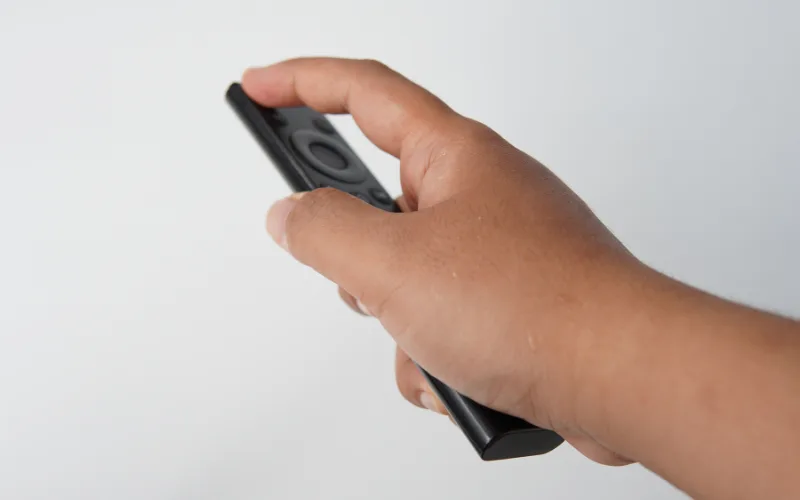
User holding an LG Magic remote pointing at a screen with a missing cursor, a software issue solved by LG TV repair in Hyderabad.
android tv repair in hyderabad, Hyderabad tv repair, LED TV Repair Hyderabad, LG TV Repair in Hyderabad, tv repair in hyderabad

LG Magic Remote Cursor Not Showing? Quick Fixes You Can Try

LG Magic Remote Cursor Not Showing? Quick Fixes You Can Try Where Did the Pointer Go? The LG Magic Remote is famous for its on-screen cursor that acts like a computer mouse. But what happens when you shake the remote and the pointer simply refuses to appear on your WebOS screen? Quick Troubleshooting Steps The Battery Check: The gyroscope and Bluetooth features drain batteries faster than standard remotes. Always try fresh alkaline batteries first. The Un-pair and Re-pair Trick: Press and hold the “Home” and “Back” buttons together for 5 seconds until the power button flashes. Then, press the scroll wheel down to register the remote again. Clear the Area: Wi-Fi routers placed directly next to the TV can cause signal interference with the remote’s Bluetooth connection. If the remote registers but the cursor drifts wildly or doesn’t move, the internal gyroscope is likely broken from being dropped. If your TV’s Bluetooth module itself is failing, reach out for professional LG Tv repair in hyderabad to get your seamless browsing experience back.

Experienced technician evaluating an older Smart TV motherboard to provide affordable TV repair in Hyderabad.
android tv repair in hyderabad, Haier TV repair in Hyderabad, Hyderabad tv repair, LED TV Repair Hyderabad, LG TV Repair in Hyderabad, MI TV Repaiar, OnePlus TV repair in Hyderabad, Philips tv repair in hyderabad, Samsung TV Repair, smart tv repair hyderabad, Sony TV Repair in Hyderabad, tv motherboard repair in hyderabad, tv repair in hyderabad

Upgrading vs. Repairing: When is Your Old TV Worth Saving?

Upgrading vs. Repairing: When is Your Old TV Worth Saving? The Ultimate Dilemma When a television breaks down, consumers immediately wonder: “Is the repair cost worth it, or should I just buy a new smart TV?” When to Repair Your TV The TV is less than 5 years old. It is a high-end OLED or QLED model where the repair cost is less than 30% of a replacement. The issue is minor, such as a faulty Wi-Fi module, blown speaker, or dead power supply board. When to Upgrade The screen panel is physically cracked (panel replacements often cost as much as a new TV). The TV is over 8 years old and no longer supports modern streaming apps. Make an informed financial decision. Reach out for an honest quote from our Affordable tv repair in hyderabad team. We pride ourselves on transparent assessments, which is why locals trust us for all their Led tv repair in hyderabad needs.

Checking a Smart TV remote's infrared sensor with a smartphone camera before calling for LG TV repair in Hyderabad.
android tv repair in hyderabad, Haier TV repair in Hyderabad, Hyderabad tv repair, LED TV Repair Hyderabad, LG TV Repair in Hyderabad, MI TV Repaiar, OnePlus TV repair in Hyderabad, Philips tv repair in hyderabad, Samsung TV Repair, smart tv repair hyderabad, Sony TV Repair in Hyderabad, tv repair in hyderabad

How to Fix a TV Remote That Stopped Working

How to Fix a TV Remote That Stopped Working Is It the Remote or the TV? When your TV stops responding to the remote, the first instinct is to smack it or change the batteries. If fresh batteries don’t work, here is how to find the real problem.   The Smartphone Camera Trick Point your infrared (IR) remote at your smartphone’s camera and press a button. If you see a purple light on your phone screen, the remote is sending a signal. This means the IR receiver inside your TV is broken.   Bluetooth Remote Resets Modern Smart TV remotes use Bluetooth. Sometimes they simply unpair. Hold down the “Return” and “Play/Pause” buttons simultaneously for 5 seconds to force a re-pairing.   If the TV’s internal sensor is damaged, we can replace it quickly. From Samsung TV repair in hyderabad to MI TV repair in hyderabad, our doorstep technicians carry exact replacement sensors for immediate fixes.

LED TV screen displaying a flickering and distorted image, a hardware problem resolved by LED TV repair services in Hyderabad.
android tv repair in hyderabad, Haier TV repair in Hyderabad, Hyderabad tv repair, LED TV Repair Hyderabad, LG TV Repair in Hyderabad, MI TV Repaiar, OnePlus TV repair in Hyderabad, Philips tv repair in hyderabad, Samsung TV Repair, smart tv repair hyderabad, Sony TV Repair in Hyderabad, tv repair in hyderabad

Flickering TV Screen: Is It a Loose Cable or a Failing Display?

Flickering TV Screen: Is It a Loose Cable or a Failing Display? Diagnosing the Flicker A blinking or strobe-light effect on your TV is not just annoying; it can cause headaches and eye strain. The root cause usually falls into one of two categories: external connections or internal hardware.   Step 1: Check the Inputs A degraded HDMI cable is often the culprit. Try swapping the cable and plugging it into a different HDMI port. If the flickering stops, the TV is fine.   Step 2: Internal Hardware Issues If the TV flickers even on the main menu without any cables attached, you are likely dealing with a failing T-Con board or dying LED backlights. Don’t ignore a flicker, as it can escalate into a complete blackout. Call our LED tv repair services in hyderabad for a swift diagnosis. Rated as the Best tv repair in hyderabad, we ensure your viewing experience remains smooth and safe.

android tv repair in hyderabad, Hyderabad tv repair, LED TV Repair Hyderabad, LG TV Repair in Hyderabad, MI TV Repaiar, Samsung TV Repair, smart tv repair hyderabad, Sony TV Repair in Hyderabad, tv repair in hyderabad

TV Repair Cost in Hyderabad 2025 — Samsung vs Sony vs LG vs Mi

TV Repair Cost in Hyderabad 2025 — Samsung vs Sony vs LG vs Mi TV repair cost varies by brand, size, and fault type. This guide provides 2025 repair pricing for Samsung, Sony, LG, Mi, OnePlus, and TCL TVs. Samsung TV Repair Cost T-Con: 1500 – 3500Backlight: 2000 – 4500Motherboard: 1800 – 4000 Sony TV Repair Cost T-Con: 1500 – 3000Backlight: 1800 – 4000Motherboard: 1800 – 4500 LG TV Repair Cost T-Con: 1200 – 2500Backlight: 1500 – 3500Motherboard: 1500 – 3500 Mi TV Repair Cost Backlight: 800 – 2500Motherboard: 1200 – 2500Boot loop: 800 – 1500 OnePlus TV Repair Cost T-Con: 1200 – 2500Backlight: 1500 – 3500Remote pairing: 300 – 800 Budget TV Brands (TCL / Hisense / Kodak) T-Con: 800 – 1800Backlight: 800 – 2500Motherboard: 1200 – 3000 Contact us for the most accurate and transparent TV repair cost estimate in Hyderabad.

LG TV Repair in Hyderabad

LG WebOS Smart TV Repair in Hyderabad — WiFi, Boot Loop & Software Bugs Explained

LG WebOS Smart TV Repair in Hyderabad — WiFi, Boot Loop & Software Bugs Explained LG WebOS Smart TVs are popular for their smooth interface, fast app loading, and excellent picture quality. However, many LG users in Hyderabad experience recurring software-related problems such as WiFi connectivity failures, continuous boot loops, app crashes, and system freezes. These issues often stem from firmware corruption, motherboard faults, or WiFi module failure. This detailed guide explains the most common LG WebOS Smart TV problems, their causes, and how our technicians repair them at your doorstep tv repair in Hyderabad. 1. LG Smart TV Not Connecting to WiFi This is one of the most frequent complaints among LG WebOS users. Possible Causes:WiFi module failureFirmware bugsRouter compatibility issuesOverheating on motherboardMAC address error in settings Fixes We Provide:WiFi module replacementMotherboard-level repairSoftware refresh or resetNetwork configuration correction We also check if the router’s frequency and security are compatible with LG WebOS. 2. LG TV Stuck in Boot Loop If your TV repeatedly restarts or gets stuck on the LG logo, it is likely facing:Corrupted firmwareDefective eMMC storageShort circuits on the motherboardPower supply instability Repair Process:Flash the correct firmwareRepair or replace the eMMC ICChip-level correction for shortsMotherboard power rail testing Boot loop repairs are typically completed the same day. 3. Apps Not Opening or Crashing on LG WebOS WebOS relies on stable internal storage and system files.Apps may crash due to: Insufficient system memoryCorrupted app dataSoftware update failureExpired certificatesOverloaded cache Repair Steps:Clear system cacheReset app dataSoftware update or installationReflashing WebOS if required These fixes improve speed and stability. 4. LG Smart TV Running Slow or Freezing Sluggish performance often indicates deeper system issues. Common Causes:Low internal memoryBackground app overloadCorrupted OS filesMotherboard IC malfunction Technician Actions:System cleanupFirmware refreshChip-level IC correctionHardware testing This restores original performance levels. 5. LG TV Remote Not Pairing or Responding Bluetooth-based LG Magic Remotes frequently face pairing issues. Reasons:IR/Bluetooth sensor failureRemote hardware damageSoftware pairing bugMotherboard communication faults We check remote hardware, sensor output, and software pairing settings. 6. Software Update Problems in LG WebOS Many users face issues after installing updates or when updates fail midway. Fix Includes:Manual software flashingRemoving faulty update filesCorrecting firmware mismatches We ensure WebOS runs smoothly and apps update without errors. LG WebOS TV Repair Cost in Hyderabad WiFi module repair: 800 – 1500Boot loop repair: 1200 – 2500Firmware installation: 500 – 1200Motherboard repair: 1500 – 3500Remote pairing issue: 300 – 800App crash fix or software refresh: 500 – 900 Cost varies based on model and fault condition. Real Case Study – LG 43-Inch WebOS TV Complaint: WiFi disconnects frequentlyDiagnosis: Faulty WiFi module heating upRepair: Replaced WiFi module and updated firmwareTime Taken: 40 minutesResult: Stable connectivity with no dropouts This showcases how common WebOS issues can be accurately resolved. Why Choose Professional LG TV Repair in Hyderabad Specialized WebOS techniciansSame-day onsite serviceAdvanced software and firmware toolsHigh-grade replacement partsRepair warranty providedTransparent pricing and detailed diagnosis LG Smart TV issues require proper technical handling to avoid further damage. Maintenance Tips to Avoid WebOS Problems Keep firmware updatedAvoid overloading appsEnsure good ventilationUse a stabilizer to prevent motherboard damageRestart the TV periodically to clear cacheKeep storage free by uninstalling unused apps These tips maintain WebOS performance and reduce software failures. Frequently Asked Questions Why won’t my LG TV connect to WiFi?Most likely a WiFi module or firmware issue that needs technician attention. Is boot loop repair expensive?Boot loop repair is affordable and usually completed the same day. Can software problems damage the panel?No, but ignoring them can lead to motherboard stress. Do LG WebOS TVs need regular updates?Yes. Updates fix bugs and improve system stability. If your LG WebOS Smart TV is having WiFi issues, boot loops, app crashes, or software bugs, contact us for fast and reliable LG TV repair in Hyderabad. Same-day doorstep repair is available across all areas.

LG TV Repair in Hyderabad

Samsung Crystal UHD & QLED TV Repair in Hyderabad — Real Problems We Fix Daily

Samsung Crystal UHD & QLED TV Repair in Hyderabad — Real Problems We Fix Daily Samsung Crystal UHD and QLED TVs deliver rich colors, excellent contrast, and advanced picture technologies. However, these models also come with unique hardware and software challenges that often require expert-level diagnosis. Many users in Hyderabad experience issues such as flickering screens, WiFi connectivity failures, display lines, HDMI ARC malfunctions, and power cycling problems. This guide explains the most common Samsung QLED and Crystal UHD TV issues we repair daily in Hyderabad, along with their causes, repair methods, and the approximate cost of service. 1. Vertical or Horizontal Lines on Samsung QLED and UHD TVs One of the most frequent issues is lines appearing on the display. These lines may be colored, black, or appear intermittently. Common Causes:Faulty T-Con boardLoose or damaged panel ribbonsOverheated ICsPanel deterioration Repair Method:We perform T-Con voltage testing, ribbon cable scanning, and panel isolation tests to determine the exact cause. Many cases are fixed with IC replacement or ribbon cleaning. 2. Samsung TV Flickering or Brightness Fluctuation QLED and UHD models use advanced backlighting systems that can malfunction due to:Power supply fluctuationsLED driver IC failureAuto-brightness sensor malfunctionFaulty backlight strips Repair Process:Brightness calibrationBacklight voltage testingDriver IC repair or replacementBacklight strip replacement 3. No Picture but Sound Works on Samsung Crystal UHD TVs If the display is blank but audio plays normally, the issue often lies in the:Backlight systemT-Con boardPanel voltage outputDisplay driver IC Technicians use a flashlight test to confirm if the image is faintly visible, indicating backlight failure. 4. Samsung Smart TV WiFi Not Connecting Connectivity problems are common in Tizen-based Samsung Smart TVs. Causes:Defective WiFi moduleFirmware corruptionRouter compatibility issuesMotherboard IC malfunction Fix:WiFi module replacementSoftware refresh or reinstallationVoltage correction on the motherboard 5. Samsung TV Boot Loop or Automatic Restarting Some Samsung models restart frequently or get stuck on the boot logo. Reasons:Corrupted firmwareShort circuit on motherboardPower supply instabilityOverheating components Repair includes firmware reinstallation, chip-level correction, and component-level testing. 6. No Signal or HDMI ARC Not Working Users often face HDMI port issues, especially HDMI ARC for soundbars. Possible Causes:Port damageCorrupted EDID dataMainboard IC failureLoose connections Repair involves re-soldering ports, correcting EDID data, or replacing the mainboard if required. 7. Backlight Bleeding or Patchy Brightness on QLED TVs QLED TVs sometimes show patchy bright spots or cloudy areas, especially in dark scenes. Causes:Worn backlight stripsUneven LED brightnessPanel pressure points Repair typically includes adjusting LED diffusers, replacing LED strips, or fixing backlight driver issues. Samsung QLED & Crystal UHD TV Repair Cost in Hyderabad Below is the approximate repair cost range: T-Con board repair: 1500 – 3500Backlight repair: 2000 – 4500WiFi module repair: 800 – 1500Motherboard repair: 1500 – 3500HDMI/ARC repair: 800 – 1800Software repair: 500 – 1200 Actual pricing depends on diagnosis, parts availability, and TV size. Real Case Study – Samsung Crystal UHD 50-Inch Complaint: Random flickering and brightness changesDiagnosis: Backlight driver IC voltage fluctuationsRepair: Driver IC replacement and LED calibrationTime Taken: 75 minutesResult: Stable picture with no flicker This showcases the importance of accurate diagnosis and expert repair. Why Choose Professional Samsung TV Repair in Hyderabad Specialized QLED and UHD techniciansSame-day doorstep serviceOriginal and high-grade componentsWarranty on repairsTransparent pricingChip-level repair capability QLED and UHD models require experienced hands to avoid panel or motherboard damage. Preventive Tips for Samsung QLED and Crystal UHD TVs Enable adaptive brightnessAvoid blocking ventilation slotsUse a good voltage stabilizerUpdate firmware regularlyDo not set brightness to maximum continuously These practices extend the lifespan of your TV components. Frequently Asked Questions Why is my Samsung QLED showing white patches?This is usually caused by uneven LED brightness or diffuser issues. Does the panel need replacement if lines appear?Not always. Many line issues are caused by T-Con or ribbon faults. Why does my Samsung TV restart repeatedly?Likely firmware or motherboard issues that require professional repair. Can HDMI ARC issues be repaired at home?No. It requires testing and re-soldering tools. If your Samsung Crystal UHD or QLED TV is facing display, sound, WiFi, or power issues, contact us for expert Samsung TV repair in Hyderabad. Same-day doorstep repair and warranty available.

Haier TV repair in Hyderabad, Hyderabad tv repair, LG TV Repair in Hyderabad, MI TV Repaiar, OnePlus TV repair in Hyderabad, Philips tv repair in hyderabad, Samsung TV Repair, Sony TV Repair in Hyderabad

LED TV Backlight Repair in Hyderabad — Costs, Symptoms & When It’s Worth Fixing

LED TV Backlight Repair in Hyderabad — Costs, Symptoms & When It’s Worth Fixing If your LED TV shows sound but no picture or the screen appears dim, flickers, or turns completely black, the issue is usually a failed backlight. Backlight problems are extremely common in LED TVs of all brands including Samsung, LG, Sony, Mi, OnePlus, Haier, and Philips. This guide explains the symptoms, causes, repair process, and approximate pricing for LED TV backlight repair in Hyderabad. If your TV has sound but no picture, you can also refer to our detailed guide. What Is a Backlight in an LED TV Backlights are LED strips placed behind the panel that illuminate the screen. If these strips fail, the TV may produce sound but the screen appears dark or nearly black. Some models use edge-lit LED strips, while premium models use full-array backlights. Regardless of type, backlight failure affects screen brightness and display quality. Common Symptoms of LED TV Backlight Failure Screen is very dim even at full brightnessTV shows no picture but sound works normallyWhite or gray haze across the displayFlickering or blinking screenTV turns on, but the picture disappears after a few secondsUneven brightness or dark patchesFlashlight test reveals faint images on the screen If any of these symptoms appear, the backlight system is likely damaged. Why LED TV Backlights Fail Natural LED degradation due to heatPoor ventilation around the TVHigh brightness settings used continuouslyVoltage fluctuationsShort circuit on the power supply boardFaulty backlight driver ICAge of TV and LED wear-outMoisture or dust accumulation Most failures are gradual and worsen over time. How We Diagnose Backlight Problems Flashlight test to confirm faint picturesVoltage testing on the backlight outputStrip-by-strip inspection for burnt LEDsDriver IC short circuit testingPanel separation to access the LED layersUniformity test after repair This ensures the root cause is accurately identified before repair. Backlight Repair vs Panel Replacement Backlight repair is recommended whenOnly LED strips are burntBacklight driver needs minor repairDisplay panel is healthyBrightness issues are uniform across the screen Panel replacement is required only whenLiquid damage reaches the panel layersMultiple layers are burnt or crackedBacklight damage spreads to PCB tracks In more than 90 percent of cases, backlight repair is sufficient and cost-effective. LED TV Backlight Repair Cost in Hyderabad Below is an approximate backlight repair price range by TV type: 32-inch LED TV: 40-inch LED TV: 43-inch LED TV: 50-inch LED TV: 55-inch LED TV: 65-inch LED TV:  Full-array or high-end models may cost slightly more due to additional LED strips. How Long Does Backlight Repair Take Standard 32-inch and 43-inch models: 45 to 90 minutesLarger TVs: 90 minutes to 2 hoursPremium QLED or UHD models: Additional testing requiredAll repairs include brightness calibration and uniformity testing. Same-day doorstep tv repair in hyderabad is available. Backlight Repair Case Study – Mi 43-Inch Smart TV Complaint: Screen completely dark but audio workingDiagnosis: Three backlight LEDs burnt in the stripRepair: Replaced full LED strip set for longevityTime Taken: 60 minutesResult: Display fully restored with improved brightness When Is Backlight Repair Not Worth It If panel is cracked or internally damagedIf TV is older than 8 to 10 yearsIf motherboard and backlight both require repair (combined high cost)If the TV size is below 32-inch and repair cost is close to replacement price In these cases, replacement may be more economical. How to Extend the Life of Your Backlight Reduce brightness to 60 to 70 percentEnable ambient mode or auto-brightness featuresEnsure proper ventilationUse a voltage stabilizerAvoid prolonged static images that strain LEDsTurn off the TV when not in use Proper maintenance can prevent overheating and extend backlight lifespan. Frequently Asked Questions What causes LED backlight failure?LED strips degrade over time due to heat, voltage issues, or defective components. Can backlight repair be done at home?No. It requires panel opening, LED strip handling, and electrical testing. Will backlight repair improve picture quality?Yes. New backlight strips significantly enhance brightness and uniformity. Does backlight repair fix a sound-only issue?If the panel is healthy, backlight replacement resolves the no-picture problem. If your LED TV screen is dim, flickering, or completely dark, it is likely a backlight issue. Contact us for quick and affordable LED TV repair in Hyderabad. Same-day service and warranty provided.

LG TV Repair in Hyderabad

Common LG Smart TV Issues and How We Repair Them in Hyderabad

Common LG Smart TV Issues and How We Repair Them in Hyderabad LG Smart TVs are reliable, but like any electronic device, they can face performance issues over time.From no picture to Wi-Fi disconnection, most problems are repairable with the right diagnosis. At Vee Techno Electronics, we specialize in LG TV repair in Hyderabad — offering doorstep service, transparent quotes, and genuine spare parts. 1. LG TV Turns On but Shows No Picture This is one of the most frequent problems we encounter.Possible causes: Faulty LED backlight strips Power board malfunction Display driver or T-CON board issues Quick tip:Check if you can faintly see an image by shining a flashlight on the screen. If yes, your TV’s backlight may have failed. Our fix:We perform backlight and driver board diagnostics, replace defective components, and calibrate brightness levels to restore full display quality. 2. LG Smart TV Has Sound but No Display When you hear sound but the screen remains black, the issue is often related to a damaged display panel or power board.Our technicians test the screen circuitry and, if necessary, replace the LED array or board using original-grade parts with a limited warranty. 3. Wi-Fi or Bluetooth Connectivity Problems Smart LG TVs sometimes lose wireless connectivity due to firmware bugs or network setting errors.We fix: Wi-Fi module resets and replacements Router compatibility adjustments Firmware updates and app reinstallations After service, your TV will reconnect smoothly to the internet and paired devices. 4. HDMI or USB Ports Not Detecting Devices Frequent plugging and unplugging can loosen or damage input ports.Our solution:We inspect and resolder HDMI connections or replace damaged ports. We also check for software glitches that prevent signal detection. 5. Audio or Speaker Problems No sound, distortion, or intermittent audio can result from: Damaged speaker coils Faulty audio amplifier IC Loose cable connections We test the internal amplifier circuits and install replacement speakers when necessary, ensuring balanced, clear sound output. Why Choose Vee Techno Electronics for LG TV Repair in Hyderabad Certified LG TV repair technicians Same-day doorstep repair service across Hyderabad Genuine parts with warranty Transparent cost estimates before repair Free on-site diagnosis with approved service Our goal is to restore your LG TV’s performance quickly and affordably, saving you the cost of replacement. Book Your LG TV Repair in Hyderabad Today If your LG Smart TV is not working properly, call +91 95151 35588 or contact us online.Our technicians will diagnose and repair the issue at your doorstep, ensuring reliable service and complete satisfaction. Related Links TV Repair Services in Hyderabad LG TV Repair in Hyderabad Contact Vee Techno Electronics

Call Us Now
WhatsApp
Scroll to Top