
Realme & Toshiba TV Screen Freezing? Motherboard Repair Services in Hyderabad
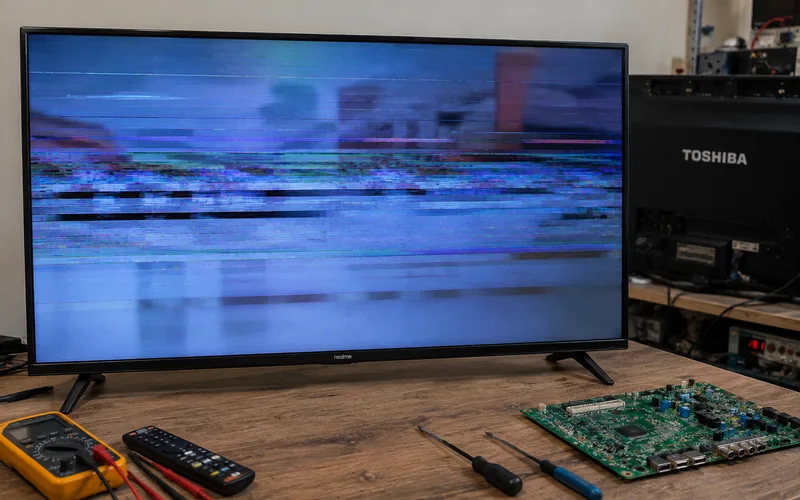
If your Realme or Toshiba TV freezes on the logo, becomes unresponsive while watching TV, keeps restarting, or gets stuck while opening apps, the problem may be related to software, firmware, internal storage, power, or the TV’s mainboard.
For customers searching for a Realme TV service center Hyderabad or Toshiba TV service center Hyderabad, the first thing to understand is that a frozen screen does not automatically mean the motherboard needs replacement.
The exact cause depends on the TV model, when the freezing happens, whether the TV restarts by itself, and whether the problem occurs with all inputs or only a particular app or source.
- If you are in Hyderabad, this guide explains the common causes of Realme and Toshiba TV freezing problems, when software troubleshooting may help, and when professional motherboard diagnosis is appropriate.
Why Does a Realme or Toshiba TV Freeze?
A smart TV is a combination of display hardware, processing hardware, storage, software and network-connected applications.
A freezing problem can therefore come from different areas.
Common possibilities include:
- Temporary software errors
- Firmware problems
- App-related crashes
- Internal storage issues
- Overheating
- Power-supply instability
- Mainboard faults
- HDMI or external-device conflicts
- Network or streaming problems
The symptom needs to be reproduced before identifying the actual cause.
For example, a TV that freezes only when opening one streaming application is different from a TV that freezes even inside the settings menu.
Realme TV Freezing or Stuck on Logo
If your Realme TV freezes during startup, you may see:
- Realme logo continuously
- Android loading screen
- Black screen after the logo
- Repeated restarting
- TV switching off and on
- TV becoming unresponsive to the remote
These symptoms can have both software and hardware causes.
Start with basic troubleshooting
Before considering motherboard repair:
- Turn the TV off.
- Disconnect it from power.
- Remove unnecessary HDMI and USB devices.
- Wait briefly.
- Reconnect the TV directly to power.
- Turn it on and observe the startup sequence.
If the TV works normally after the reset, the problem may have been temporary.
If the same freezing or restarting happens repeatedly, further diagnosis may be necessary.
Realme TV Service Center Hyderabad: When Do You Need Repair?
If you’re searching for a Realme TV service center Hyderabad, first determine what the TV is actually doing.
Situation 1: TV freezes only in one app
The issue may be related to:
- Application data
- App software
- Network
- TV software
Situation 2: TV freezes in multiple apps
The technician may need to check:
- System software
- Internal storage
- Memory/resources
- Mainboard
Situation 3: TV freezes even in settings
This is more significant because the problem isn’t limited to one streaming application.
A technician may need to investigate the TV’s software and hardware.
Situation 4: TV keeps restarting
Possible areas of diagnosis include:
- Power supply
- Mainboard
- Software/firmware
- Storage
- Thermal issues
A restart loop should not automatically be diagnosed as a motherboard failure.
Realme TV Software Problem vs Motherboard Problem
The difference matters because the repair approach can be completely different.
Software-related problem
A software-related issue may occur after:
- System update
- App installation/update
- Configuration change
- Temporary system error
Depending on the model and problem, software troubleshooting may resolve it.
Hardware-related problem
A hardware issue becomes more likely when the TV:
- Freezes repeatedly
- Restarts without warning
- Cannot complete startup
- Becomes unresponsive across different functions
- Shows additional power or display symptoms
The mainboard may then need professional testing.
Toshiba TV Freezing Problems
Toshiba smart TVs can also experience freezing or unresponsive behaviour.
A Toshiba TV may:
- Freeze on startup
- Become slow
- Stop responding to the remote
- Freeze while opening an application
- Restart unexpectedly
- Lose network connectivity
- Show a frozen picture while sound continues
The exact troubleshooting procedure depends on the model.
Toshiba’s official TV support resources provide product support, troubleshooting information, manuals and warranty resources, and note that features can vary between models.
Therefore, don’t apply a reset procedure designed for a different Toshiba TV model.
Toshiba TV Stuck on Logo
If a Toshiba TV remains on the startup logo, start with basic checks.
Step 1: Power reset
Disconnect the TV from the electrical outlet.
Step 2: Disconnect external devices
Remove:
- HDMI devices
- USB drives
- Set-top boxes
- Gaming consoles
- Streaming devices
Step 3: Restart
Reconnect the TV and check whether it completes startup.
Step 4: Observe the behaviour
Does it:
- Stay permanently on the logo?
- Restart repeatedly?
- Reach the home screen and freeze?
- Display a black screen?
- Respond to the remote?
These details help determine the next diagnostic step.
Toshiba TV Freezes While Watching Netflix or YouTube
If the TV freezes only while using a particular streaming application, don’t immediately assume that the motherboard is defective.
First consider:
- Internet connection
- Application issue
- TV software
- Available storage/resources
- Application update
- Temporary system error
Try another application or input.
Example
If:
YouTube freezes
but
TV settings work normally
and
HDMI input works normally
the issue may be different from a TV that freezes everywhere.
This distinction can save you from unnecessary hardware replacement.
Realme & Toshiba TV Motherboard Problems
The motherboard, also called the main board, handles many important functions of a smart TV.
Depending on the TV design, it may be involved in:
- Processing video signals
- Running the operating system
- Managing applications
- Handling inputs
- Network functions
- Audio/video processing
- Communication with other boards
A fault on the mainboard can therefore create different symptoms.
But a frozen TV is not enough evidence to conclude that the motherboard has failed.
Signs That May Require Mainboard Diagnosis
A technician may investigate the motherboard when the TV shows persistent symptoms such as:
1. Repeated boot loops
The TV starts, freezes and restarts continuously.
2. Freezing across all functions
The TV freezes in apps, settings and external inputs.
3. Startup failure
The TV cannot complete its normal boot process.
4. Random restarting
The TV repeatedly switches off and restarts without user input.
5. Multiple functions fail together
For example:
- Apps stop working
- HDMI inputs malfunction
- Network functions fail
- TV freezes
This combination may justify deeper mainboard diagnosis.
Again, these are diagnostic clues, not proof of motherboard failure.
Can a Realme or Toshiba TV Motherboard Be Repaired?
In some cases, a technician may determine that a board-level repair is possible.
In other cases, complete board replacement may be more practical.
The decision depends on:
- TV model
- Board number
- Fault location
- Component availability
- Board condition
- Repair complexity
- Availability of a suitable replacement board
Board-level repair
Can be considered when a specific fault is identified and the board is otherwise suitable for repair.
Complete motherboard replacement
May be considered when the board has extensive damage or a suitable replacement is available at a reasonable cost.
The correct approach is to diagnose the board before deciding.
Realme TV Motherboard Repair Cost
There is no universal Realme TV motherboard repair cost.
The price can vary according to:
- Screen size
- Model
- Mainboard version
- Fault
- Availability of replacement components
- Board-level repair requirements
- Complete board replacement
- Labour
A quotation based only on:
“Realme TV motherboard problem”
is therefore only an estimate.
The model number should be checked before giving a final price.
Toshiba TV Motherboard Repair Cost
The same principle applies to Toshiba TVs.
The repair cost depends on:
- Toshiba TV model
- Mainboard part number
- Type of fault
- Component availability
- Repair vs replacement
- Labour
- Warranty offered
A newer Toshiba QLED model and an older LED model can have very different motherboard designs and repair costs.
So a fixed price for “Toshiba TV motherboard repair” would be misleading without knowing the model.
Is Motherboard Replacement Better Than Repair?
Not always.
Suppose a TV has a single identifiable board-level fault.
If the board is otherwise healthy and the required repair is practical, repairing it may be an option.
But if the board has extensive damage or a suitable replacement is readily available, replacement may make more sense.
Compare:
| Option | When it may make sense |
|---|---|
| Software troubleshooting | Software/configuration issue |
| Firmware service | Firmware/startup issue |
| Board-level repair | Specific board fault identified |
| Motherboard replacement | Board is extensively damaged or replacement is practical |
| TV replacement | Repair cost is too high compared with TV value |
The final decision should be based on diagnosis and the TV’s age/value.
Don’t Ignore Power Problems
A TV that freezes and restarts may not necessarily have a motherboard problem.
Power-related issues can sometimes produce symptoms such as:
- Random shutdown
- Restarting
- Freezing
- Failure to boot
- Intermittent operation
The technician may therefore need to inspect the power supply along with the mainboard.
Replacing the motherboard without checking the power side can result in an unnecessary repair.
Can You Fix a Frozen Realme or Toshiba TV at Home?
You can try basic troubleshooting first.
Safe checks include:
- Power reset
- Disconnecting HDMI devices
- Removing USB devices
- Checking the remote batteries
- Testing another input
- Checking whether the TV freezes in settings
- Testing another application
- Checking the network connection when the problem is app-specific
If the TV remains frozen or repeatedly restarts, avoid opening the television yourself.
Internal boards and display components require appropriate tools and technical knowledge.
When Should You Call a TV Repair Technician?
Professional diagnosis is recommended when:
- The TV repeatedly freezes.
- It gets stuck on the logo.
- The TV keeps restarting.
- The remote stops responding.
- Multiple apps stop working.
- The TV freezes even inside settings.
- The TV has sound but the picture freezes.
- The TV shows additional power/display problems.
- Basic troubleshooting doesn’t solve the problem.
If the television is still under manufacturer warranty, check the applicable warranty and service options before choosing an independent repair provider.
Realme TV Service Center Hyderabad
If you’re looking for a Realme TV service center Hyderabad, Vee Techno Electronics provides TV repair services for Realme televisions in Hyderabad.
Common problems include:
- Realme TV stuck on logo
- Realme TV freezing
- Realme TV boot loop
- Realme TV restarting
- Realme TV motherboard problems
- Realme TV no picture
- Realme TV sound problems
- Realme TV software problems
- Realme TV power problems
- Realme TV display problems
When contacting a technician, provide:
Brand: Realme
Model: ______
Screen size: ______
Problem: ______
Location: Hyderabad
A short video showing the freezing or restarting behaviour can also help communicate the problem clearly.
Toshiba TV Service Center Hyderabad
If you’re searching for a Toshiba TV service center Hyderabad, Vee Techno Electronics can diagnose common Toshiba LED and Smart TV problems.
These can include:
- Toshiba TV freezing
- Toshiba TV stuck on logo
- Toshiba TV boot problems
- Toshiba TV restarting
- Toshiba TV motherboard problems
- Toshiba TV display issues
- Toshiba TV backlight problems
- Toshiba TV sound problems
- Toshiba TV power problems
- Toshiba TV software-related issues
Toshiba’s official support resources provide model-specific support, troubleshooting, manuals and warranty information, so the exact model should be identified before applying a repair procedure.
Realme & Toshiba TV Repair in Hyderabad
Vee Techno Electronics provides TV repair services in Hyderabad for Realme, Toshiba and other major TV brands.
Whether your TV is:
- Frozen on the logo
- Stuck while loading an app
- Restarting repeatedly
- Freezing during streaming
- Showing a black screen
- Losing sound or picture
- Experiencing motherboard-related symptoms
the correct first step is diagnosis.
A frozen TV does not automatically mean that the motherboard needs to be replaced.
The technician should determine whether the cause is related to software, firmware, power, storage, a board, an external device or another component.
Frequently Asked Questions
Why is my Realme TV freezing?
Possible causes include software problems, application issues, firmware, internal storage, power instability or hardware faults. The exact cause depends on when and how the TV freezes.
Why is my Toshiba TV stuck on the logo?
A startup freeze can have software or hardware-related causes. Power-reset and model-specific troubleshooting should be attempted before assuming that the motherboard has failed.
Does a frozen TV need motherboard replacement?
Not necessarily. A software, firmware, power or external-device issue can produce similar symptoms. Diagnosis should come before motherboard replacement.
How much does Realme TV motherboard repair cost?
There is no single price for every Realme TV. The cost depends on the model, board version, fault and whether board-level repair or complete replacement is required.
How much does Toshiba TV motherboard repair cost?
It depends on the Toshiba model, motherboard part number, fault, parts availability and repair method. A final quotation should be provided after diagnosis.
Can a TV motherboard be repaired instead of replaced?
Sometimes. If a specific board-level fault can be identified and repaired reliably, board repair may be possible. In other cases, replacement may be more practical.
My TV freezes only on Netflix. Is the motherboard faulty?
Not necessarily. If other TV functions work normally, the problem could be related to the application, network or software. Test other apps and inputs before assuming hardware failure.
How do I find a Realme TV service center in Hyderabad?
Search for a TV repair provider in your Hyderabad service area and provide the exact Realme TV model and problem. If the TV is under manufacturer warranty, check the brand’s official service options first.
How do I find a Toshiba TV service center in Hyderabad?
Provide the Toshiba model number and describe exactly where the TV freezes or restarts. Model-specific troubleshooting and diagnosis can then be performed.
Final Takeaway
A Realme or Toshiba TV that freezes, restarts or gets stuck on its logo needs diagnosis—not an automatic motherboard replacement.
Start with basic troubleshooting:
Power reset → disconnect external devices → test different inputs/apps → observe the exact freezing behaviour → check the model-specific support information.
If the problem continues, professional diagnosis can determine whether the issue is related to software, firmware, power, storage, motherboard or another component.
For customers searching for a Realme TV repair Hyderabad or Toshiba TV service center Hyderabad, Vee Techno Electronics can diagnose the problem and recommend the appropriate repair based on the actual fault.